PoGadgets
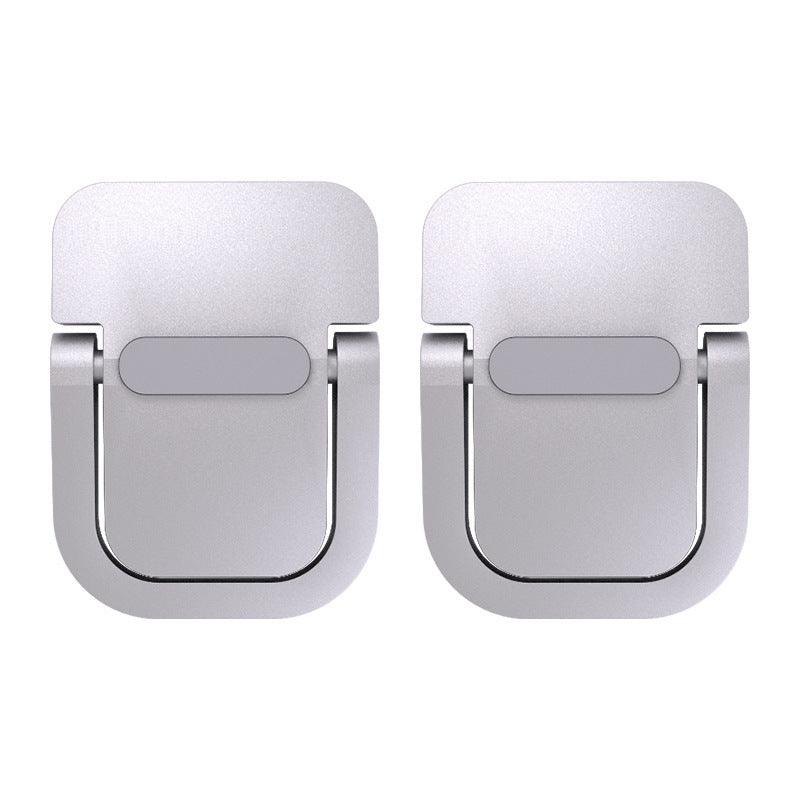
Zinc Alloy Invisible Laptop Stand - Ultra-Thin Foldable Riser (2PCS)
Couldn't load pickup availability
The stand you won’t even notice — until you need it. The Zinc Alloy Invisible Laptop Stand is designed to disappear beneath your laptop. Ultra-thin, foldable, and made from premium zinc alloy, these two small brackets lift your laptop to a better angle and improve airflow without adding any visible bulk to your setup. Available in Black, Gold, and Silver — each pack includes 2 pieces.
What Makes It “Invisible”?
Most laptop stands are obvious. They sit on your desk, they take up space, and they change the look of your setup whether you want them to or not. The Invisible Stand works differently. The two zinc alloy brackets tuck under the rear corners of your laptop, lifting it just enough to improve airflow and typing angle — without anyone noticing they’re there. Your laptop looks like it’s floating.
Why You’ll Love It
- Truly minimal design: Folds flat and hides beneath your laptop. No visible stand, no cluttered desk.
- Premium zinc alloy build: Dense, rigid, and built to last. Won’t flex, crack, or deform under daily use.
- Better airflow: Lifts your laptop off the desk to open the bottom vents and reduce heat buildup.
- Improved typing angle: Slight elevation reduces wrist strain and improves comfort during long sessions.
- 2PCS per pack: One for each rear corner of your laptop for balanced, stable elevation.
- Three color options: Black, Gold, Silver — match your laptop’s finish for a seamless look.
Features Explained
- Zinc alloy construction: Heavier and more rigid than plastic or aluminum. Handles the weight of any standard laptop without flexing.
- Foldable design: Each bracket folds flat for storage and travel. Unfolds in one motion when needed.
- Anti-slip contact points: Protects your desk surface and keeps the brackets firmly in place beneath your laptop.
- Color-matched options: Black, Gold, and Silver finishes designed to complement popular laptop colors and finishes.
- Compact and lightweight: 86g total for the pair. You won’t notice them in your bag.
The Full Story
There’s a growing movement in workspace design toward setups that look clean, intentional, and uncluttered. The Invisible Laptop Stand was made for that movement. It does everything a laptop stand should do — elevates your device, improves airflow, reduces wrist strain — without adding anything visible to your desk.
The zinc alloy construction is what makes this possible at such a small size. Zinc alloy is dense enough to stay put under a heavy laptop without needing a large footprint. It doesn’t flex. It doesn’t slide. It just holds, quietly and invisibly, while you work.
The three color options — Black, Gold, Silver — are designed to match the most common laptop finishes on the market. If you have a Space Grey MacBook, go Black. If you have a Gold MacBook Air, go Gold. If you have a Silver MacBook Pro or a light-colored Windows laptop, go Silver. The goal is for the brackets to disappear into the bottom of your laptop so completely that no one knows they’re there.
Each pack includes 2 pieces — one for each rear corner of your laptop. Place them, fold them away when you’re done, and carry them in your bag without thinking about it.
Specifications
| Specification | Details |
|---|---|
| Material | Zinc Alloy |
| Style | Foldable, ultra-thin |
| Weight (pair) | 86g |
| Colors Available | Black, Gold, Silver |
| Quantity per Pack | 2 pieces |
| Compatibility | All laptops and tablets |
| Contact Points | Anti-slip pads |
What’s in the Box
- 2x Zinc Alloy Invisible Laptop Stand brackets (color of your choice)
How to Use
- Step 1: Choose your color (Black, Gold, or Silver) to match your laptop finish.
- Step 2: Unfold each bracket into its open position.
- Step 3: Place one bracket under each rear corner of your laptop base.
- Step 4: The anti-slip contact points will grip your desk surface automatically.
- Step 5: To pack up, remove your laptop, fold the brackets flat, and place them in your bag.
Who Is This For?
- Minimalists who want a clean desk without a visible laptop stand.
- MacBook users who want color-matched accessories that blend with their device.
- Remote workers who need a portable, lightweight elevation solution for any location.
- Anyone who wants better laptop airflow and typing angle without changing the look of their setup.
Frequently Asked Questions
How many pieces come in one pack?
Each pack includes 2 pieces — one for each rear corner of your laptop for balanced, stable elevation.
Which color should I choose?
Match your laptop finish: Black for Space Grey or dark laptops, Gold for Gold MacBook Air or similar, Silver for Silver MacBook Pro or light-colored Windows laptops.
Will it scratch my desk?
No. The anti-slip contact points protect your desk surface from scratches while keeping the brackets firmly in place.
Is zinc alloy strong enough to hold a heavy laptop?
Yes. Zinc alloy is denser and more rigid than aluminum or plastic, making it more than capable of supporting any standard laptop without flexing.
Can I use it on a glass desk?
Yes. The anti-slip pads grip glass, wood, laminate, and most smooth desk surfaces effectively.
Is it truly invisible under my laptop?
The brackets are ultra-thin and designed to sit flush under the rear corners of your laptop. When viewed from the front, they are barely visible — especially when color-matched to your device.
Does it work with all laptop brands?
Yes. The brackets are compatible with all laptops and tablets regardless of brand or size.
How portable is it?
Very. At 86g for the pair and folding completely flat, the brackets fit in any bag pocket or laptop sleeve without adding noticeable bulk.
Does it come with a warranty?
All PoGadgets products are covered by our return policy and manufacturer warranty. Visit our Returns & Warranty page or contact our support team for full details — we’re happy to help.
Can I use just one bracket instead of two?
You can, but using both brackets provides balanced elevation and better stability for your laptop.
Share
- Secure Checkout
- 14-Day Returns
- Worldwide Shipping